

—
If you’re weighing SaneBox vs Superhuman, you’re comparing two of the best email management tools available. But they solve fundamentally different problems. Superhuman helps you process email faster. SaneBox helps you receive less email in the first place.
The tool you choose all depends on the problem you’re trying to solve.
If your inbox is already under control and you want to fly through messages with keyboard shortcuts, AI drafting, and a beautifully designed interface, Superhuman may be exactly what you’re looking for.
But if your problem is that you’re drowning in newsletters, notifications, CCs, automated messages, and low-priority conversations, becoming faster at email may not solve the underlying issue. You don’t need to run faster on the email treadmill. You may need to step off it, and SaneBox can dramatically cut down the email load.
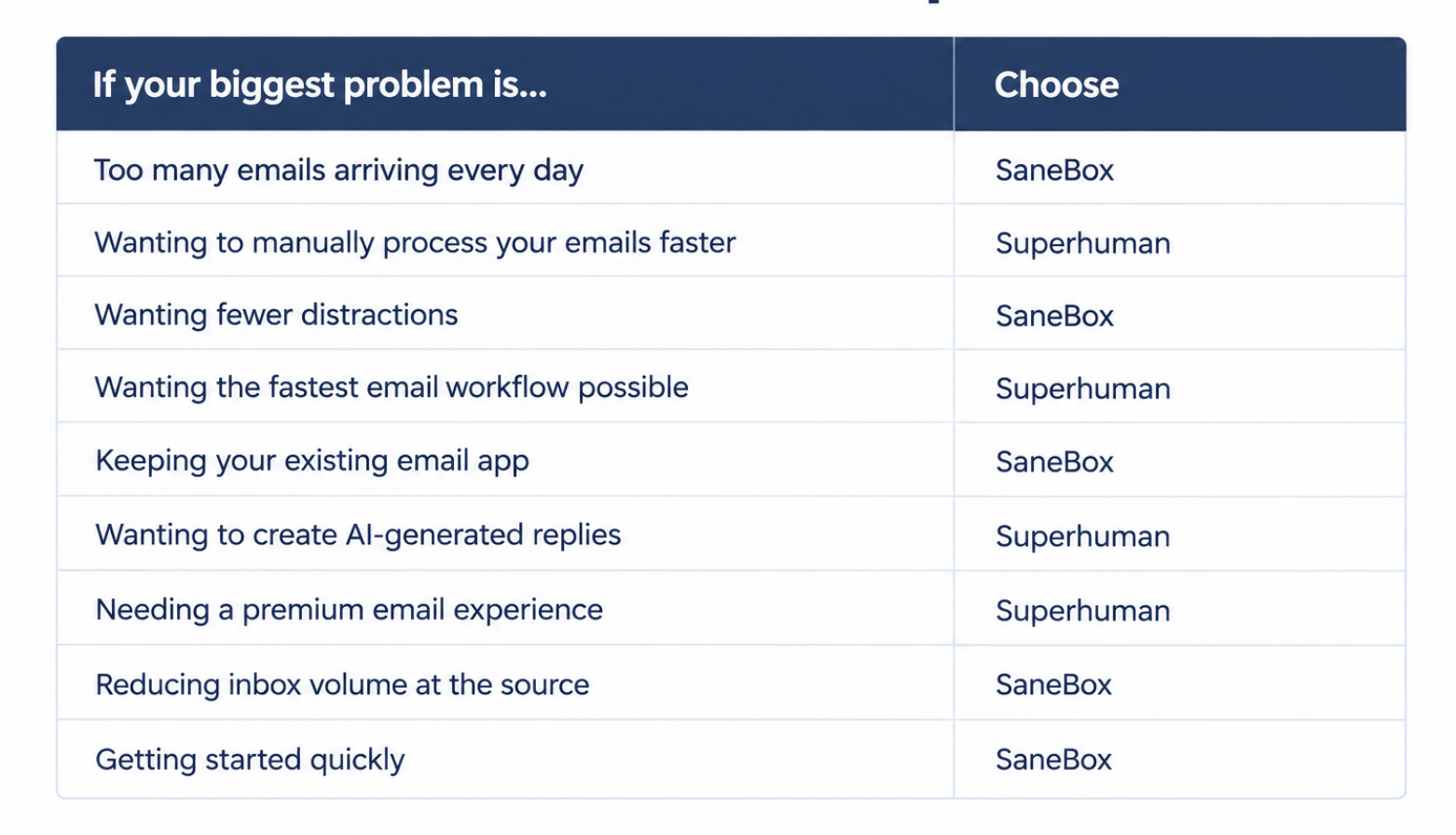
Quick verdict: SaneBox vs Superhuman
What is SaneBox?
SaneBox is an AI-powered email management tool designed to help people regain control of overloaded inboxes.
Instead of asking users to manually create dozens of rules, labels, and filters, SaneBox learns from your email behavior.
It observes patterns such as:
- Who you reply to
- Which messages you open
- Which senders matter to you
- What types of emails you tend to ignore
It then automatically separates important messages from distractions.
Low-priority emails are moved out of your main inbox into folders such as:
- SaneLater: emails that can wait
- SaneNews: newsletters and updates
- SaneBlackHole: unwanted senders that disappear permanently
The result: Instead of opening your inbox and seeing hundreds of messages demanding attention, you see a smaller collection of emails that actually need you.
You don’t need to migrate your workflow or learn how to use a new inbox.
SaneBox works with the email client you already use, including Gmail, Outlook, Apple Mail, and other email applications.
What is Superhuman?
The Superhuman email app is a premium client designed around speed. Rather than improving Gmail or Outlook, Superhuman replaces them with its own interface.
Its philosophy is simple: Email takes too much time. Make every action faster.
Superhuman focuses on:
- Keyboard shortcuts
- Rapid navigation
- Split inbox organization
- Reminders
- AI-powered writing assistance
- A highly designed user experience
For people who spend hours every day inside email, these optimizations can add up. A salesperson managing dozens of conversations, a founder handling investor communication, or an executive processing hundreds of messages may really enjoy Superhuman’s speed-focused workflow, especially if design and user experience are important to them.
SaneBox and Superhuman solve different problems
Imagine receiving 150 emails per day.
Superhuman asks: “How can I process those 150 emails faster?”
SaneBox asks: “How can I make sure only the important 12 emails reach me?”
The biggest difference: where they operate
Superhuman operates at the email app level
Superhuman replaces your existing email application. You open Superhuman instead of Gmail or Outlook.
Everything happens inside its interface:
- reading
- replying
- organizing
- searching
- composing
Its advantage is speed and workflow optimization. The disadvantage is learning to use a different tool, and changing your workflows to be Superhuman-led. If you use a work email account, you’ll need to check that your organization allows integration with Superhuman (some don’t).
SaneBox operates at the account level
SaneBox works before email reaches your inbox. It connects directly to your email account and filters incoming messages before they appear in your primary inbox.
Your email client stays the same, your workflow stays the same, SaneBox simply changes what reaches your attention.
In a nutshell: Superhuman is like buying a faster car, SaneBox is like having less traffic to deal with on the drive.
SaneBox vs Superhuman: Full comparison

1. Inbox triage and filtering
Winner: SaneBox
The average inbox problem isn’t always that people are too slow, it’s that too many things compete for attention. Every newsletter, notification, automated update, and “just keeping you in the loop” email…all these distractions add up to a feeling of overwhelm.
SaneBox’s core job is deciding what should interrupt you. Its AI filtering engine learns from your behavior and automatically moves lower-priority messages away from your main inbox.
You spend less time deciding what matters.
Superhuman approaches this differently. Its Split Inbox feature helps users organize incoming messages into categories, but the user still works through those messages inside Superhuman.
Superhuman helps you make decisions faster.
But SaneBox reduces the number of decisions you need to make.
For someone receiving hundreds of emails per day, reducing the volume of decisions often has a bigger impact than improving the speed of each decision.
2. Speed of processing
Winner: Superhuman
Speed is Superhuman’s reason for existing. Its keyboard-driven interface is designed for people who want to move through email at maximum speed.
Users can:
- Archive instantly
- Navigate without touching the mouse
- Respond quickly
- Search faster
- Manage conversations through shortcuts
For experienced users, the difference compared with traditional Gmail or Outlook can feel dramatic.
If your inbox is already clean and your biggest frustration is that email takes too long to process, Superhuman might be a good fit.
This isn’t SaneBox’s zone, because SaneBox isn’t trying to make you faster at reading hundreds of emails. It’s trying to ensure you don’t need to read hundreds of emails.
Superhuman makes email faster. But SaneBox makes email smaller.
3. AI writing assistance
Winner: Superhuman
Superhuman has made AI writing a central part of its product experience.
Its AI features help users:
- Draft replies
- Rewrite messages
- Adjust tone
For professionals who spend a significant portion of their day writing emails, this can be a major productivity boost.
SaneBox takes a different approach. Its AI is focused primarily on organization and prioritization rather than composition.
The question is not: “How can AI help me write this email faster?”
The question is: “Does this email need my attention at all?”
For users looking for an AI writing assistant built directly into their email workflow, Superhuman has the advantage.
For users whose biggest frustration is that too many emails demand replies in the first place, SaneBox addresses the earlier problem.
4. Follow-ups and reminders
Winner: Tie
Both SaneBox and Superhuman understand a common email problem: Important conversations get buried.
A message you meant to answer disappears. A client waiting on a reply slips through the cracks. Both products provide tools to help close those loops.
SaneBox follow-up tools
SaneBox includes features designed to surface unanswered conversations:
SaneNoReplies
Shows emails you’ve sent where you haven’t received a response.
Useful for:
- sales follow-ups
- partnership conversations
- client communication
- important requests
SaneReminders
Lets you schedule reminders for emails that need attention later.
For example:
“Remind me if I don’t hear back by Friday.”
These tools work regardless of which email client you use.
Superhuman follow-up tools
Superhuman includes follow-up reminders directly inside its application.
5. Compatibility and switching costs
Winner: SaneBox
This is one of the biggest practical differences between the two products. SaneBox works with your existing email setup, regardless of your preferred tools.
You can keep using:
- Gmail
- Outlook
- Apple Mail
- Mobile email apps
- Your current habits and workflows
There is no migration, no new inbox, no need to relearn years of muscle memory. SaneBox sits in the background and improves the inbox you already have.
Superhuman is designed as a replacement email experience. That means users need to:
- Adopt a new application
- Learn a keyboard-first workflow
- Adjust existing habits
- Spend time becoming fluent in the system
For power users, this investment can pay off. But not everyone wants another productivity system to master.
For someone who thinks: “I like Gmail. I just wish it was less overwhelming”, SaneBox is likely the more natural fit.
6. Pricing
Winner: SaneBox
Many readers compare SaneBox pricing against Superhuman’s before deciding, and it’s one of the clearest differences between the two.
SaneBox is designed as an affordable productivity layer that most users can add without much hesitation.
Typical pricing
The price difference reflects the different products.
Superhuman is positioned as a premium productivity application for people who spend significant time inside email.
SaneBox is designed to give almost anyone a quieter inbox without a major financial commitment.
7. Privacy and security
Winner: Tie
Both companies take email security seriously.
SaneBox does not sell user data or serve advertising. Its approach is built around reducing inbox noise without requiring users to hand over control of their email workflow.
Superhuman is also a mature email platform with enterprise-grade security practices.
Neither product’s core value proposition is based on exploiting email data. The better question for users is not: “Which one is safer?” but “Which approach fits how I want to interact with email?”
Some users prefer adding a lightweight filtering layer to their existing setup. Others prefer moving into a dedicated email environment.
Can you use SaneBox and Superhuman together?
Yes. Many people assume they need to choose between SaneBox and Superhuman, but in reality they operate at different layers.
Superhuman is the interface where you process email. SaneBox is the filtering system deciding what reaches that interface.
Think of it this way:
- SaneBox reduces the workload.
- Superhuman accelerates the workflow.
Together, they address two different sources of email frustration.
A Superhuman user might still receive hundreds of emails every day. A faster interface helps, but it doesn’t change the number of incoming messages.
Adding SaneBox underneath can reduce the volume before those messages appear in Superhuman.
One way to describe the relationship:
“Superhuman is the interface I process email in. SaneBox is what decides what’s worth surfacing in the first place. One makes me fast. The other makes sure I’m only fast on what matters.”
For someone already paying for Superhuman, SaneBox doesn’t necessarily replace that investment. It can make that investment more effective.
Who should choose SaneBox?
SaneBox is the better fit if:
Your problem is email volume
You don’t need a faster way to process 200 emails.
You need fewer emails competing for your attention.
You want to keep your existing tools
If you like Gmail, Outlook, Apple Mail, or your current setup, SaneBox improves what you already use.
You value simplicity
Unlike many email management tools, SaneBox doesn’t require learning:
- New keyboard shortcuts
- A new interface
- A new workflow
It works quietly in the background.
You want better focus
A smaller inbox means:
- Fewer interruptions
- Fewer context switches
- Less time deciding what matters
You want to try before committing
SaneBox offers a free trial so users can experience the difference before paying.
Who should choose Superhuman?
Superhuman is the better fit if:
Speed is your bottleneck
If you already know what matters but processing it takes too long, Superhuman’s workflow improvements can help.
You enjoy productivity systems
Some people love optimizing workflows.
They enjoy:
- Shortcuts
- Keyboard commands
- Mastering tools
- Building efficient systems
Superhuman is designed for those users who want to devote time to mastering a new workflow.
AI writing matters
If drafting emails is a major part of your day, Superhuman’s AI features may be valuable.
You want a premium email experience
Superhuman is built around polish. For users who spend hours inside email every day, the interface itself can justify the investment.
SaneBox vs Superhuman: The final verdict
The answer depends on what you want email to do for you.
If you want to become faster at handling email: Choose Superhuman.
If you want fewer emails demanding your attention: Choose SaneBox.
For some professionals, the ideal setup is both:
- SaneBox decides what deserves attention.
- Superhuman helps you handle those important conversations quickly.
The best email system isn’t necessarily the one that helps you process the most messages.
It’s the one that helps you spend less of your life managing them.
Frequently asked questions
Is SaneBox better than Superhuman?
It depends on your problem. SaneBox is better for reducing email volume and distractions. Superhuman is better for processing email quickly through a dedicated, keyboard-focused interface. If your inbox feels overwhelming, SaneBox is usually the better starting point. SaneBox reviews tend to praise how much quieter the inbox gets, while Superhuman reviews focus on speed, which sums up the difference.
Can you use SaneBox with Superhuman?
Yes. SaneBox and Superhuman can work together because they operate at different layers. SaneBox filters email at the account level, while Superhuman provides the interface for reading and responding.
Does Superhuman replace Gmail?
Yes. Superhuman is a replacement email application that connects to Gmail and Outlook accounts. You use Superhuman instead of Gmail’s interface.
Does SaneBox replace Gmail?
No. SaneBox works alongside Gmail rather than replacing it. You continue using Gmail, or any other email provider of your choice, including Outlook, Apple Mail, and more.
Which is better for Gmail users: Superhuman or SaneBox?
Both SaneBox and Superhuman work well with Gmail, but they solve different problems. Choose SaneBox if you want Gmail to feel quieter. Choose Superhuman if you want a Gmail replacement that feels fast and looks good.
Which is better for Outlook users?
Both Superhuman and SaneBox support Outlook accounts. SaneBox is a good choice for users who want to keep using Outlook while reducing inbox clutter. Superhuman is better for users willing to move into a new email interface.
Is Superhuman worth the money?
For people who spend many hours every day processing email, Superhuman’s speed improvements may justify the premium price (US$33+ per month). For people whose main problem is email overload, reducing the number of messages by using a tool like SaneBox may deliver more value.
Does SaneBox use AI?
Yes. SaneBox uses AI-based filtering to learn which emails are important and automatically organize incoming messages.
Does SaneBox read my emails?
SaneBox is designed to prioritize email without using your inbox as an advertising data source. SaneBox never reads your email, nor does it store full bodies of email or attachments, only scanning what it needs to organize your inbox, such as headers and senders. Users who are especially privacy-conscious should review the company’s current privacy and security documentation before connecting any email service.
Which saves more time: SaneBox or Superhuman?
They save time in different ways. Superhuman saves time by making each email interaction faster. SaneBox saves time by reducing how many interactions you need to have. For people overwhelmed by inbox volume, reducing messages often has the bigger impact.
Is there a cheaper alternative to Superhuman?
Yes. SaneBox is one option for users who want to improve email productivity without paying for a premium email client. However, it is not a direct replacement. It solves the problem of inbox overload rather than email processing speed.
Should I use SaneBox and Superhuman together?
If you love Superhuman but still receive too much email, using both can make sense. SaneBox reduces the number of messages reaching your inbox. Superhuman helps you process the messages that remain. Together, they address both sides of email overload: volume and velocity.
You must be logged in to post a comment.